Gun Assets
Ranged weapons can be used as a source of damage. Ranged weapons always show quality.
This inherits the WeaponAsset class.
Game Data File
Item Asset Properties
GUID 32-digit hexadecimal: Refer to GUID documentation.
Type enum (Gun)
Useable enum (Gun)
Slot enum (Primary, Secondary, Tertiary, Any)
ID uint16: Must be a unique identifier.
Gun Asset Properties
Alert_Radius |
float |
|
Radius where zombies and animals should be alerted when firing ranged weapons, measured in meters. |
Aim_In_Duration |
float |
|
How long it takes to fully aim down sights, in seconds. |
Aiming_Movement_Speed_Multiplier |
float |
See description |
Multiplier on the player’s movement speed while aiming down sights. Defaults to |
Can_Aim_During_Sprint |
bool |
|
If true, the player can sprint while aiming down sights. |
Gunshot_Rolloff_Distance |
float |
See description |
Distance over which the gunshot audio rolls off until it is completely inaudible, in meters. Defaults to |
Range_Rangefinder |
float |
See description |
Overrides the maximum distance displayed when using a Rangefinder tactical attachment on this weapon. For example, it may be useful to set this property when using |
Scale_Aim_Animation_Speed |
bool |
|
If true, the length of the “Aim_Start” and “Aim_Stop” animations are scaled to match |
Turret |
flag |
n/a |
This weapon should be treated as a vehicular turret. This flag will affect the player’s first-person viewmodel. |
Calibers
Attachment_Calibers |
int32 |
|
Total number of unique hook attachment calibers. Cannot be used with |
Attachment_Caliber_# |
uint16 |
|
ID of a caliber to check for hook attachment compatibility. Requires |
Caliber |
uint16 |
|
ID of the caliber to check for hook attachment and magazine attachment compatibility. To configure hook attachment and magazine attachment compatibility separately, use the |
Magazine_Calibers |
int32 |
|
Total number of unique magazine attachment calibers. Cannot be used with |
Magazine_Caliber_# |
uint16 |
|
ID of a caliber to check for magazine attachment compatibility. Requires |
Requires_NonZero_Attachment_Caliber |
bool |
|
If true, attachments must specify at least one non-zero caliber. For example, this can be used to make vanilla attachments incompatible with this weapon. |
Damage
Damage_Falloff_Multiplier |
float |
|
Percentage of damage to apply at maximum range. For example, a falloff multiplier value of |
Damage_Falloff_Range |
float |
|
Percentage of maximum range where damage begins decreasing. For example, a falloff range value of |
Damage_Falloff_Max_Range |
float |
|
Percentage of maximum range where damage stops decreasing. For example, a max falloff range value of |
Instakill_Headshots |
bool |
|
If true, performing a headshot on a player will instantly kill that player. This does not apply to zombies who have been headshot, unless the single-player world or multiplayer server’s difficulty configuration has the |
In addition to the damage properties available from the the WeaponAsset class, GunAssets have some exclusive properties.
Effects
Explosion |
GUID or uint16 |
|
GUID or legacy ID of the effect to play upon an explosive projectile’s detonation. |
Muzzle |
GUID or uint16 |
|
GUID or legacy ID of the effect to play after shooting, emitted from the gun’s “Barrel” GameObject. |
Shell |
GUID or uint16 |
See description |
GUID or legacy ID of the effect to play after shooting, emitted from the gun’s “Eject” GameObject. Defaults to |
Firing Mechanism
Action |
enum ( |
|
The rocket-action mechanism has inherently explosive projectiles, uses physics projectiles instead of ballistic projectiles, and has infinite firing range. By default, a ranged weapon using the string-action mechanism can only be fired while aiming down sights. |
Auto |
flag |
n/a |
An automatic firing mode should be available. |
Fire_Delay_Seconds |
int32 |
|
Delay before the weapon is actually fired, in seconds. |
Firerate |
byte |
|
Affects the minimum number of ticks between the firing of each bullet. The actual rate of fire is equal to |
Bursts |
int32 |
|
Number of shots to fire when using the burst firing mode. When a value greater than |
Safety |
flag |
n/a |
A safety firing mode should be available. |
Semi |
flag |
n/a |
A semi-automatic firing mode should be available. |
Hooks Attachments
Barrel |
uint16 |
|
Legacy ID of the barrel attachment that should be attached by default. |
Grip |
uint16 |
|
Legacy ID of the grip attachment that should be attached by default. |
Sight |
uint16 |
|
Legacy ID of the sight attachment that should be attached by default. |
Tactical |
uint16 |
|
Legacy ID of the tactical attachment that should be attached by default. |
Hook_Barrel |
flag |
n/a |
Specified if the ranged weapon should have a barrel attachment slot. |
Hook_Grip |
flag |
n/a |
Specified if the ranged weapon should have a grip attachment slot. |
Hook_Sight |
flag |
n/a |
Specified if the ranged weapon should have a sight attachment slot. |
Hook_Tactical |
flag |
n/a |
Specified if the ranged weapon should have a tactical attachment slot. |
Jamming
When using the Can_Ever_Jam flag, ranged weapons have a chance of jamming once their quality drops below a specified threshold. From the initial threshold to 0%, the chance of jamming on each shot is blended between 0% and a specified max chance. The “ChamberJammed” AudioClip is played when a jam occurs, as well as the animation “UnjamChamber” if present. For an example, the Cobra_Jam (ID 1521) is included in the game files.
Can_Ever_Jam |
flag |
n/a |
Specified if the weapon can jam. |
Jam_Quality_Threshold |
float |
|
Decimal representative of the quality percentage threshold for jamming can begin to occur. Requires |
Jam_Max_Chance |
float |
|
Decimal-to-percent chance for jamming to occur. Requires |
Unjam_Chamber_Anim |
string |
|
Name of the animation clip to play for unjamming. Requires |
Magazine Attachments
Allow_Magazine_Change |
bool |
|
If false, the magazine in the weapon cannot be unloaded (unplaced), replaced, or reloaded. This is similar to the “Hook_” properties available for determining valid hook attachment slots. |
Ammo_Max |
byte |
|
Maximum for the random amount of ammo to generate in the magazine attachment that is attached by default. |
Ammo_Min |
byte |
|
Minimum for the random amount of ammo to generate in the magazine attachment that is attached by default. |
Ammo_Per_Shot |
byte |
|
Number of ammunition consumed per shot. |
Delete_Empty_Magazines |
flag |
n/a |
Specified if the attached magazine should be deleted when depleted. Deprecated in favor of |
Hammer_Time |
float |
|
Multiplier on the time it takes to finish pulling back the hammer on the ranged weapon after firing. Only values greater than or equal to |
Infinite_Ammo |
bool |
|
If true, ammunition is not depleted from the attached magazine attachment. Effectively, this allows for infinite ammo so long as there is a magazine attachment equipped with at least one round in it. |
Magazine |
uint16 |
|
Legacy ID of the magazine attachment that should be attached by default. |
Magazine_Replacements |
int32 |
|
Total number of unique conditions with alternative default magazine attachments. |
Magazine_Replacement_#_Map |
string |
empty |
Name of the map the |
Magazine_Replacement_#_ID |
uint16 |
|
Legacy ID of the alternative magazine attachment that should be used when on the map specified by |
Reload_Time |
float |
|
Multiplier on time it takes to finish reloading the ranged weapon. Only values greater than or equal to |
Replace |
float |
|
Multiplier of the reload animation length before the magazine is respawned. Must be greater than or equal to |
Should_Delete_Empty_Magazines |
bool |
See description |
Overrides how empty magazines are handled by the action item mode. When set to |
Unplace |
float |
|
Multiplier of the reload animation length before the magazine is despawned. |
Projectiles (Ballistics System)
All Action mechanisms other than the rocket-action mechanism utilize the ballistics projectile system. To avoid a mismatch between max range and manual ballistic range, it is recommended to only have either Ballistic_Steps or Ballistic_Travel specified – not both.
Ballistic_Steps |
byte |
See description |
Lifespan of ballistic projectiles. A higher value relative to |
Ballistic_Travel |
float |
See description |
Travel speed of ballistic projectiles. A higher value relative to |
Bullet_Gravity_Multiplier |
float |
See description |
Multiplier for gravity’s acceleration. This multiplier defaults to |
Ballistic_Drop |
float |
|
Deprecated since version 3.23.7.0: Replaced by |
Projectiles (Physics System)
When using Action Rocket, the ranged weapon utilizes the physics projectile system.
Ballistic_Force |
float |
|
How much force should be applied to the projectile, measured in Newtons. Applicable to the rocket action, and usage ignores all other advanced ballistic options. |
Projectile_Explosion_Launch_Speed |
float |
|
Players caught within an area-of-effect explosion caused by the ranged weapon are launched at this speed. For example, this can be used to create velocity-related items like “rocket-jumping” mods. |
Projectile_Lifespan |
float |
|
Lifespan of physics projectiles, in seconds. |
Projectile_Penetrate_Buildables |
flag |
n/a |
Area-of-effect explosions caused by |
Recoil
Aiming_Recoil_Multiplier |
float |
|
Recoil magnitude multiplier while the gun is aiming down sights. |
Recoil_Sprint |
float |
|
Multiplier on camera recoil while sprinting. Requires |
Recoil_Crouch |
float |
|
Multiplier on camera recoil while crouched. |
Recoil_Prone |
float |
|
Multiplier on camera recoil while prone. |
Recoil_Min_X |
float |
|
Minimum horizontal camera recoil in degrees. |
Recoil_Min_Y |
float |
|
Minimum vertical camera recoil in degrees. |
Recoil_Max_X |
float |
|
Maximum horizontal camera recoil in degrees. |
Recoil_Max_Y |
float |
|
Maximum vertical camera recoil in degrees. |
Recover_X |
float |
|
Multiplier on camera degrees to be counter-animated horizontally over the next 250 milliseconds. |
Recover_Y |
float |
|
Multiplier on camera degrees to be counter-animated vertically over the next 250 milliseconds. |
Recoil_Aim |
float |
n/a |
Deprecated since version 3.23.7.0: Removed, and no longer has any effect. |
Shake
Shake_Min_X |
float |
|
Minimum 𝘟-axis model shake. |
Shake_Max_X |
float |
|
Maximum 𝘟-axis model shake. |
Shake_Min_Y |
float |
|
Minimum 𝘠-axis model shake. |
Shake_Max_Y |
float |
|
Maximum 𝘠-axis model shake. |
Shake_Min_Z |
float |
|
Minimum 𝘡-axis model shake. |
Shake_Max_Z |
float |
|
Maximum 𝘡-axis model shake. |
Spread
Spread_Aim |
float |
|
Spread multiplier when aiming down sights. This is multiplied by the |
Spread_Angle_Degrees |
float |
|
Bullet angle of deviation away from the aiming direction. For example, |
Spread_Hip |
float |
|
Replaced by |
Spread_Sprint |
float |
|
Spread multiplier when sprinting. Requires |
Spread_Crouch |
float |
|
Spread multiplier when crouched. |
Spread_Prone |
float |
|
Spread multiplier when prone. |
Rewards
Gun assets can use quest rewards. For example, every time the ranged weapon is fired an item could be spawned in the player’s inventory. Alternatively, shooting the ranged weapon may be required to complete a quest. For more information, refer to the Rewards documentation.
These rewards are prefixed with Shoot_Quest_. For example, Shoot_Quest_Rewards 1.
Unity Asset Bundle Contents
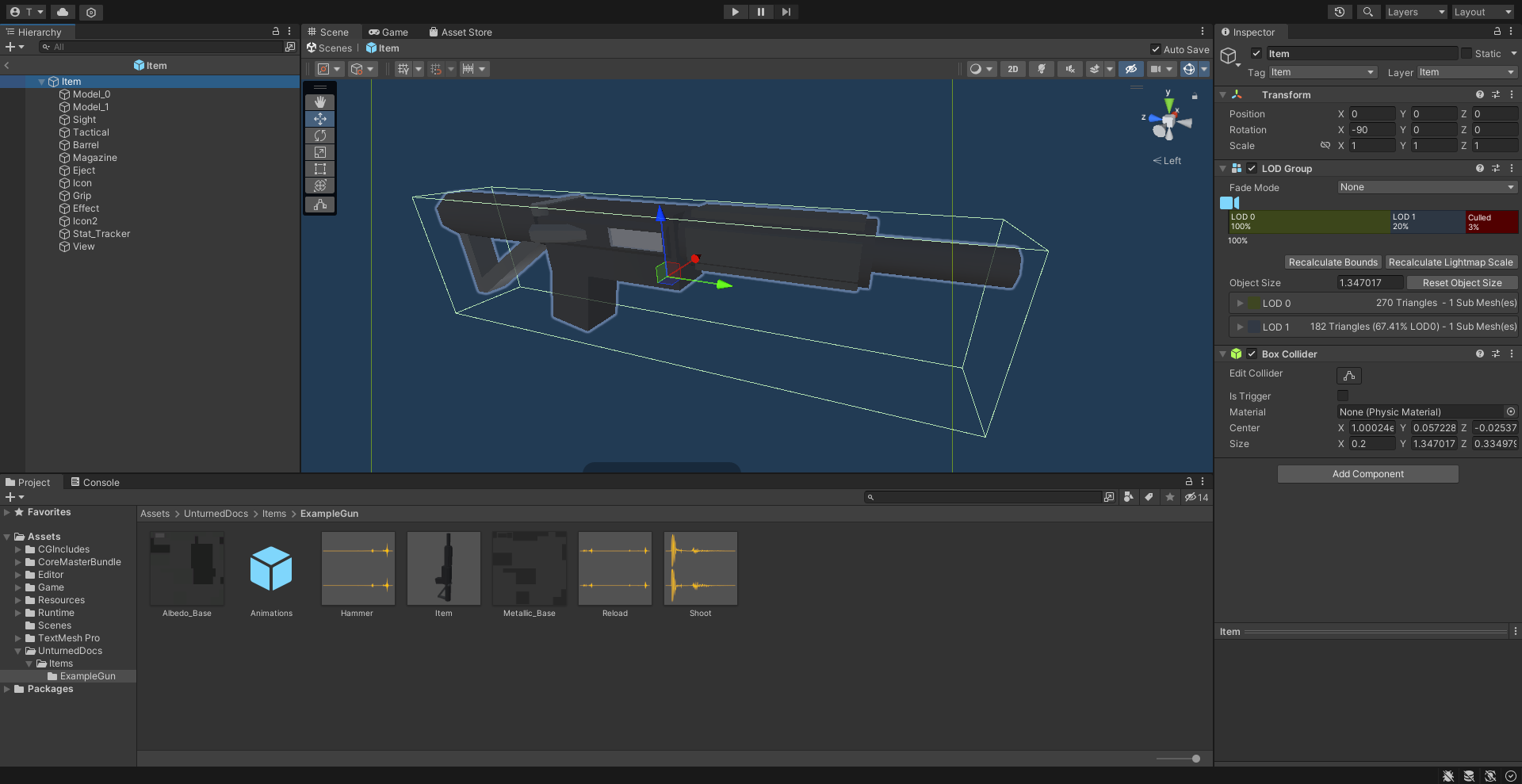
An example of a gun being set up in the Unity editor.
To get started, either follow the steps to begin creating a custom item from the introduction, or duplicate the contents of a prepackaged example asset.
Item (Prefab)
Open the “Item” Prefab, and add six child GameObjects named “Barrel”, “Grip”, “Sight”, “Tactical”, “Magazine”, and “Eject”. Most custom guns will want to have these six child GameObjects, although they are not strictly required.
The “Barrel”, “Grip”, “Sight”, “Tactical”, and “Magazine” GameObjects will determine the location of attachments on your gun. The “Sight” GameObject also determines where the camera will be positioned when aiming down sights. Shells are emitted from the “Eject” GameObject.
If an “View” GameObject is added, the camera will use its position when aiming down sights whenever a sight attachment has not been attached to the gun.
Additional Setup for Bows
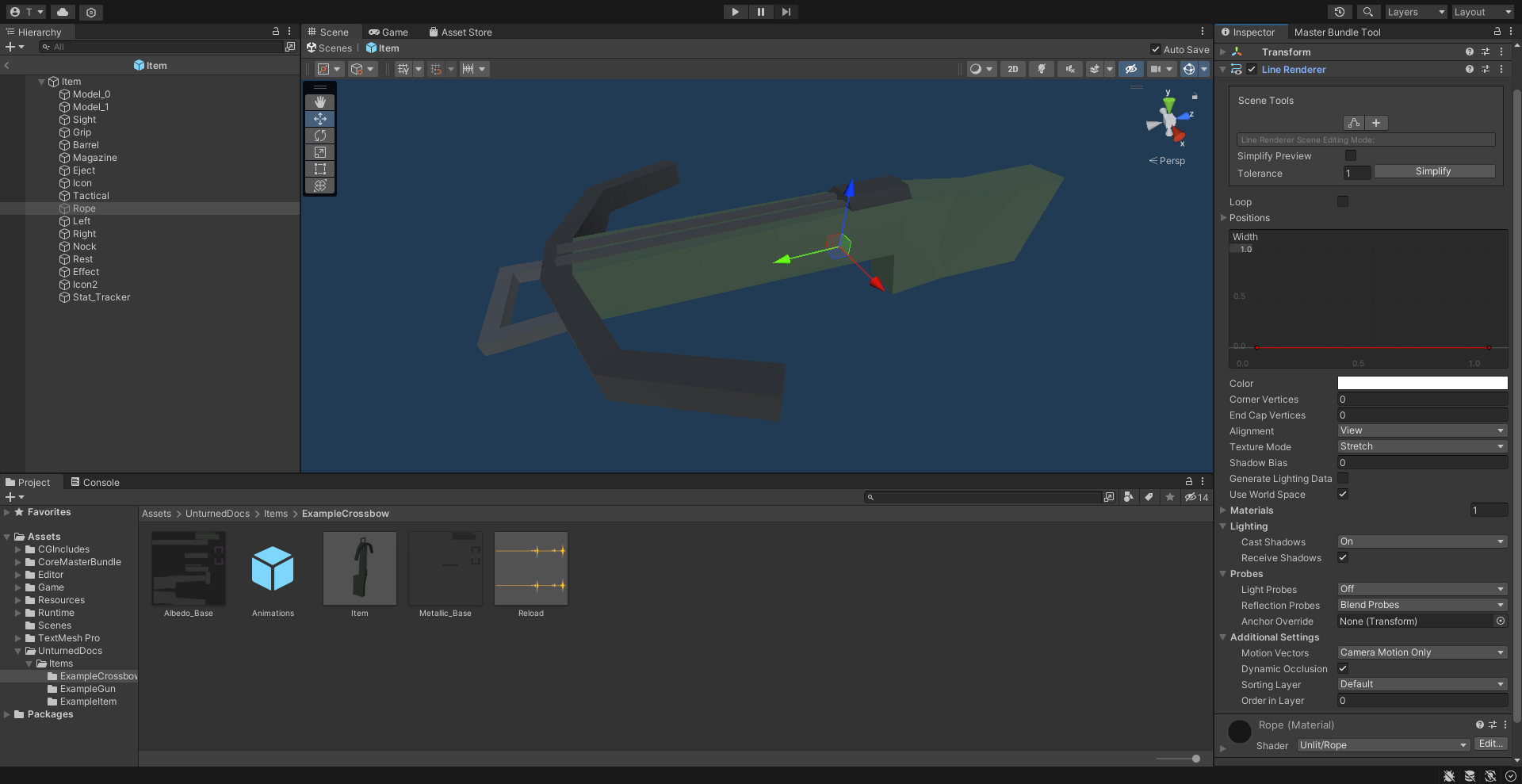
An example of a crossbow being set up in the Unity editor.
Bows require additional GameObjects to simulate the drawing of the bowstring. Note that bowstrings are only simulated from the first-person perspective.
Add a new child GameObject named “Rope”, and set its state to inactive. The “Rope” GameObject should include a Line Renderer component. Vanilla bowstrings use a custom Material named “Rope” with the Unlit-Rope Shader, but this is not required.
Add two child GameObjects named “Left” and “Right”. These GameObjects will determine the end points of the bowstring. If a third GameObject named “Rest” is included, it will be used as the middle point of the bowstring when aiming down sights.
Including a fourth GameObject named “Nock” will allow the bow to be fired without aiming down sights. Additionally, the “Rest” GameObject will act as a middle point when not aiming down sights, and the “Nock” GameObject will act as a middle point while aiming down sights.
Additional Setup for Economy Items
There are several child GameObjects that can be added related to skins. Custom items are ineligible to receive skins, so there is usually no reason to add these to the Prefab.
If an item has an “Icon2” GameObject included, its position and orientation will be used when generating icons of skins on this item. A GameObject named “Stat_Tracker” determines the location where stat trackers will appear on the gun, while a GameObject named “Effect” will determine the position of mythical effects on the gun.
Animations (Prefab)
In addition to animations used by any equippable item, guns have an additional set of animations that they can use.
Adding animations named “Aim_Start” and “Aim_Stop” will cause an animation to be played whenever the player starts or stops aiming down sights. Animations named “Attach_Start” and “Attach_Stop” will play when an attachment is attached or unattached to the gun. The “Sprint_Start” and “Sprint_Stop” animations play when the player starts and stops sprinting. The “Reload” animation is played when reloading the gun.
The “Hammer” animation is played under certain conditions where it would make sense to manually eject a cartridge from the gun. For example: after reloading an gun that had an empty magazine, or after firing a bolt-action rifle.
The “Scope” animation is played when firing a single-shot weapon while scoped. For example, a bolt-action rifle or pump-action shotgun.
If a gun is configured to use the gun jamming feature, the “UnjamChamber” animation will play when a jam occurs.
Audio Clips
In addition to the Audio Clips that can be included for equippable items, guns have an additional set of audio clips they can use.
If an Audio Clip named “Shoot” is included, it will play after the gun is fired. Including Audio Clips named “Reload” and “Hammer” will cause audio to play after reloading and hammering the gun, respectively.
An “Aim” Audio Clip can be included to have audio play after aiming down sights. For example, a longbow might want to have an the sound of the bow being drawn play. Miniguns can also include an Audio Clip named “Minigun” to have audio play while revving the minigun.
If a gun is configured to use the gun jamming feature, the “ChamberJammed” Audio Clip will play when a jam occurs.